

- Digital
- Culture
- Sports
- Créativité
- Digital
- Culture
- Sports
- Créativité
PolitiqueA Starter’s Guide to Moving Between Casino Devices
MANFE TAMETANG RUFANE1 octobre 20269 Mins read

Modern casino play no longer restricts you to a single screen. Many of us start a session on a laptop during a quiet afternoon, then pick up a smartphone to play a few rounds while commuting, and later get comfortable with a tablet on the sofa. At LeoVegas Casino, we developed our platform with exactly that rhythm in mind. This guide guides you through everything you need to know about moving smoothly between devices, from the technical requirements and installation steps to the features that make the mobile experience feel complete. We will discuss how your account, balance and preferences stay with you wherever you log in, and we will offer practical tips on performance, data usage and security so you can switch with confidence. By the end, you will realize why a mobile-first approach makes device switching feel effortless.
How Seamless Device Switching Is Important for Casino Players
Casino entertainment has become a fluid part of daily life rather than a planned event at a desktop computer. A player might explore the game lobby on a phone during a lunch break, deposit funds, and then move to a tablet at home for a longer live dealer session. Without a central account system, that natural flow would be broken by separate logins, mismatched balances and lost game history. We built the LeoVegas experience so that your identity, wallet and gameplay preferences remain unchanged no matter which screen you use. This continuity is not just a benefit; it affects how you manage your bankroll and how you explore new games, because every action you take on one device is immediately reflected on all others.
Device switching also counts for practical reasons. Mobile networks and Wi-Fi availability change throughout the day, and a game that runs perfectly on a home broadband connection might need a more efficient alternative when you are on the move. By ensuring it simple to move between a desktop browser, a smartphone app and a tablet, we give you the ability to adapt your play to your environment without ever feeling trapped into a single setup. The same responsible gaming limits, bonus progress and loyalty points travel with you, so you never have to recheck where you stand. That peace of mind is the basis of a relaxed, enjoyable session, regardless of the device in your hand.
Core In-App Capabilities That Vary from the Desktop Experience
A Touch-Optimized Game Hall
The mobile lobby has been reworked around touch navigation rather than simply shrinking the desktop layout. Large, thumb-friendly tiles let you browse through game categories, and a persistent search bar appears at the top of the screen so you can navigate directly to a specific title. Filters for game providers, themes and features are placed into an expandable menu that maintains the main view uncluttered. When you tap a game tile, it launches in full-screen mode with controls placed at the bottom of the display, exactly where your thumbs naturally rest. This design choice ensures one-handed play comfortable on larger phones, and the interface automatically adapts when you rotate your device to landscape mode for table games that are suited from a wider view.
Push Notifications and Custom Alerts
Among the most significant differences between the app and the desktop browser is the ability to receive push notifications leovegas-casino.cc. After you opt in, we can send you gentle alerts about fresh game releases, upcoming tournaments and the conclusion of a bonus wagering period, all without you needing to keep the app open. These notifications are fully customisable in the app settings, so you can choose to receive only the types of messages that interest you. Unlike email, push alerts appear discreetly on your lock screen or notification centre, letting you stay informed without interrupting your day. The system also respects your responsible gaming preferences; if you have set a reality check timer, the app will use a local notification to remind you of your session duration even if you have silenced marketing alerts.
Mobile-Optimised Banking
Depositing and withdrawing funds through the app is simplified to fit the way people use their phones. The cashier recalls your preferred payment method and shows it at the top of the list, while still offering you quick access to all available options. For added speed, the app connects device-level security features so you can confirm a deposit using your fingerprint or face scan, bypassing the need to enter a card CVV or e-wallet password each time. Withdrawal requests mirror the same workflow as on desktop, and your transaction history is fully visible across all devices. The mobile cashier also shows real-time currency conversions if you play in a currency different from your account base, giving you complete clarity before you approve any transaction.
Steps to Get and Activate the LeoVegas Casino App
Installing on an iPhone or iPad
Getting the app onto an Apple device is easy and follows the same process you would use for any trusted application. Launch the App Store on your iPhone or iPad, tap the search tab and type “LeoVegas Casino” into the search field. Look for our official app, which is available under the verified developer account and displays the familiar LeoVegas lion logo. Press the download icon and authenticate the installation with Face ID, Touch ID or your Apple ID password if prompted. Once the app appears on your home screen, you can launch it and log in with your existing account details. There is no need to set up a separate mobile account; your username and password remain the same. The app will routinely check for updates when you launch it, so you will always have the latest version without any manual intervention.
Getting It on an Android Smartphone or Tablet
Because the Google Play Store limits real-money gambling apps in many countries, we provide the Android app directly through our mobile site. Begin by opening the browser on your Android device and visiting the official LeoVegas website. Find the app section, where you will find a clearly marked download button for Android. Tapping it will begin downloading the APK installation file. Before you can install it, your device will likely ask you to permit installations from unknown sources. You can activate this by going to Settings, then Security or Apps & notifications, and enabling the option for the browser you used. After the download finishes, open the APK file and follow the on-screen prompts to install the app. Once installed, you can deactivate the unknown sources setting again if you prefer. The app will get updates through the same channel, and you will be notified when a new version is available for download.
Compatible Devices and OS Requirements
Apple Devices
The LeoVegas Casino app is fully compatible with iPhones and iPads using iOS 12 or later. This includes a broad range of models, from the iPhone 6s and newer through to the latest releases, as well as iPad Air, iPad mini and iPad Pro generations that support the required operating system. We suggest keeping your device updated to the most recent iOS version available, as this guarantees you receive the latest security patches and performance improvements that help the app run smoothly. The app is optimised for both portrait and landscape orientations, and it adjusts its layout to different screen sizes without losing any functionality. If you are uncertain about your current iOS version, you can verify it in the Settings app under General and About, then compare it against the requirements listed on our official app page before downloading.
Android Devices
For Android users, the app is compatible with smartphones and tablets using Android 7.0 (Nougat) and above. This encompasses devices from major manufacturers such as Samsung, Google, OnePlus, Xiaomi and many others that meet the minimum OS threshold. Because real-money gambling apps are not offered through the Google Play Store in most regions, we make available the Android application as a direct download from the LeoVegas website. You will have to enable installation from unknown sources in your device settings before proceeding, a step we describe in detail in the installation section below. While the app is created to work across a broad spectrum of hardware, newer devices with at least 3 GB of RAM and a mid-range processor or better will provide the most responsive touch controls and quickest game loading times. Older hardware that meets the OS requirement can still run the app, though you may notice slightly longer loading screens for graphics-heavy live casino tables.
Accessing and Syncing Your Account Between Devices
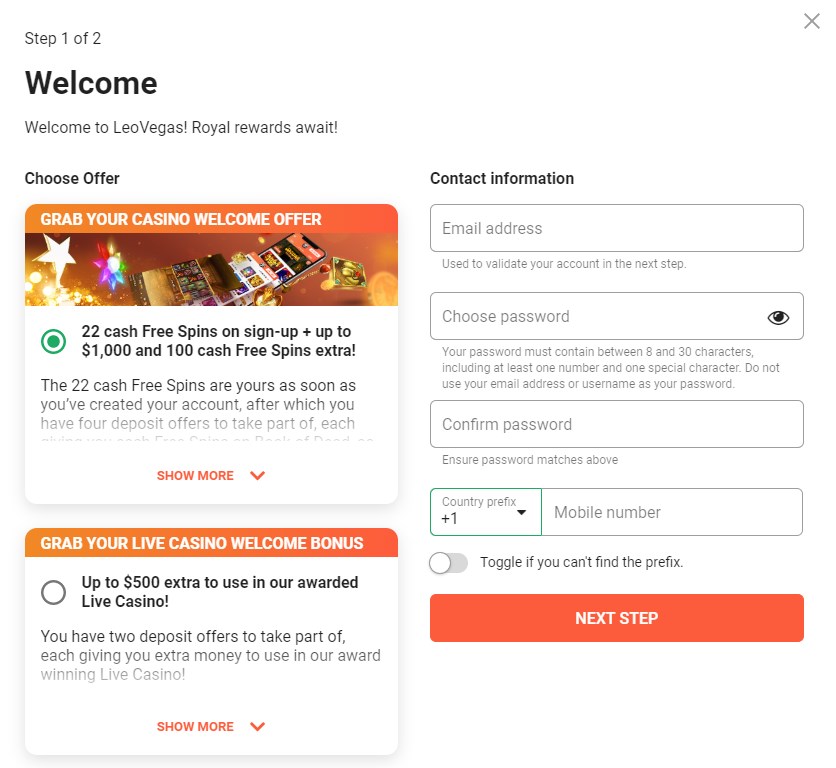
Your LeoVegas account is the sole key that opens your full casino experience, no matter the device you choose. When you access on a new phone or tablet for the first time, simply enter the same email address and password you used during registration. Within a short time, your real-money balance, bonus funds, free spins and loyalty status will be fully synchronised. This also indicates that any deposit limits, loss limits or session reminders you have set will be active immediately, because those controls are tied to your account and not to a particular device. We created the platform so that you can begin a game on your desktop, exit the browser, and pick up playing on your mobile app without losing any progress on active bonus wagering requirements or tournament leaderboard positions.
For added convenience, the app includes biometric login methods where your device hardware allows it. On iPhones and iPads you can enable Face ID or Touch ID, and on many Android devices you can use fingerprint recognition. Once turned on in the app settings, this allows you to sign in with a quick scan instead of typing your password each time, while still maintaining your account protected behind your device’s native security layer. In case you need to change devices mid-session, simply disconnect on the first device and sign in on the second. The system will automatically terminate the previous session to avoid any conflict, and your balance will show all completed game rounds instantly. We suggest logging out of shared or public devices as a standard security habit, even though the app will expire after a period of inactivity.
Performance, Bandwidth Usage, and Optimising Your Mobile Play
Knowing Data Consumption
Various game types consume data at distinct rates, and understanding this assists you control your mobile plan effectively. Slot games are generally light on data because they retrieve a fixed set of graphics and then use small bursts of information for each spin. A usual five-minute slot session might use only a few megabytes. Live dealer games, on the other hand, transmit high-quality video from a studio, which implies they use data more like a video call. A live blackjack or roulette table can consume several megabytes per minute based on the stream quality your connection supports. If you are on a restricted data plan, we suggest connecting to Wi‑Fi for extended live casino sessions. The app does not apply a data cap, but you can monitor your usage through your device’s built-in data tracker and adjust your habits accordingly.
Tips for Smooth Performance
To get the most responsive experience, ensure your operating system and the LeoVegas app current to the latest versions. Updates often feature performance tweaks that cut loading times and enhance touch responsiveness. Shutting background apps that you are not using clears memory and can avoid occasional stuttering during graphically intensive games. If you observe your device becoming warm during a long session, taking a short break helps the hardware cool down and protects battery health. Most modern smartphones include a battery saver mode that controls background activity; while this can increase play time, it may also slightly reduce frame rates in live streams. We suggest experimenting with your device’s power settings to find a balance that works for your typical session length. The app itself offers a low-bandwidth mode for live casino, which lowers video resolution when your connection is slow, assisting you stay in the game without buffering interruptions.
Keeping Secure and Playing Responsibly When Moving Between Devices
Protecting Your Account on Several Devices
Using more than one device does not mean raising your risk, given that you follow a few straightforward habits. Always create a strong, unique password for your LeoVegas account and avoid reusing it elsewhere. If available, enable two-factor authentication through the account settings on our website; this adds an extra verification step that secures your login even if someone acquires your password. On the app itself, activate biometric lock so that each time you open it, your face or fingerprint is required. If you ever misplace a device or suspect unauthorised access, you can remotely log out of all active sessions from the security section of your account page. We also recommend logging out manually when you finish playing on a shared tablet or a borrowed phone, even though the app will automatically time out after a period of inactivity.
Responsible Gambling Tools That Stay With You
Every accountable gambling control you set on one device applies instantly across all others. Deposit limits, loss limits, wagering limits and session time reminders are account-level settings, so they are not set separately on your phone, tablet and computer. If you enable a reality check, the app will display a pop-up notification at your chosen interval no matter which device you are using, giving you a clear moment to review your session length and choose whether to continue. Self-exclusion and time-out periods are equally unified; once you take a break, you will be unable to log in from any device for the duration you selected. We recommend you to check out these tools in the “My Account” section of the app or website and to modify them whenever your circumstances change. Having consistent protection across every screen gives you the freedom to switch devices without ever losing sight of your limits.
Switching between casino devices should feel like going from one room to another in the same house, familiar and effortless. Once you have installed the LeoVegas app on the gadgets you use most, you will see how naturally your balance, game history and personal settings track you. The mobile experience is not a simplified afterthought; it is a comprehensive casino built for touch, with its own thoughtful conveniences like biometric login, push notifications and a lobby designed for your thumbs. As you get into a routine that might involve a desktop in the morning, a phone at midday and a tablet in the evening, the platform does the quiet work of holding everything aligned. Your next step is simply to go to the official app page from your preferred device, download the app, and log in. From that moment on, every screen becomes your personal casino.
Related Articles
Όροι Μπόνους που Πρέπει να Γνωρίζει Κάθε Παίκτης στο Sportuna Casino στην Ελλάδα
Η λήψη ενός μπόνους σε ένα online καζίνο μπορεί να μοιάζει με...
21bit Casino Evaluation: Bonus Rules and Betting Requirements
For NZ players examining an online 21bitcasino sports bets Casino is best...
Monopoly Live Stats Outcomes Historical Past & Tracker – 2026
Monopoly Junior later simplified its system to include only one-dollar bills. The...
Independent Review of Fastpay Casino for Deutschland Gaming Community
Fastpay Casino markets itself as a straightforward online gaming platform targeted at...
Cherchez-vous à augmenter vos gains avec des jackpots impressionnants? betscarab casino dès aujourd'hui, explorez une vaste sélection de machines à sous et multipliez vos chances.
××Nous vous remercions de votre intérêt pour notre entreprise. Pour obtenir des informations supplémentaires sur nos services, veuillez nous contacter en utilisant le canal si dessous.
- Culture
- Culture






Leave a comment